 Kutter
Help › In depth
Clone your voice so it sounds good
Set up the room, the mic, and how you read so your cloned voice sounds natural the first time.
Goal: a cloned voice that sounds like you really talking, with no echo, air-conditioner hum, or distortion.
You need an ElevenLabs key (an ElevenLabs plan that allows voice cloning) and a Kutter plan of Creator or higher. For the basic steps, see Clone your voice.
Prepare the room and mic before you record
- A quiet room without echo — turn off the air conditioner and fans, and close the windows. A room with curtains, a wardrobe, or a sofa echoes less than an empty one.
- Keep the mic about a hand's width from your mouth — any closer and your breathing gets picked up; any farther and the room sound gets in.
- Use the same mic you record your real clips with — the cloned voice will sound closer to the clips you record yourself.
- Mute notifications on your phone and computer.
Record clean takes
-
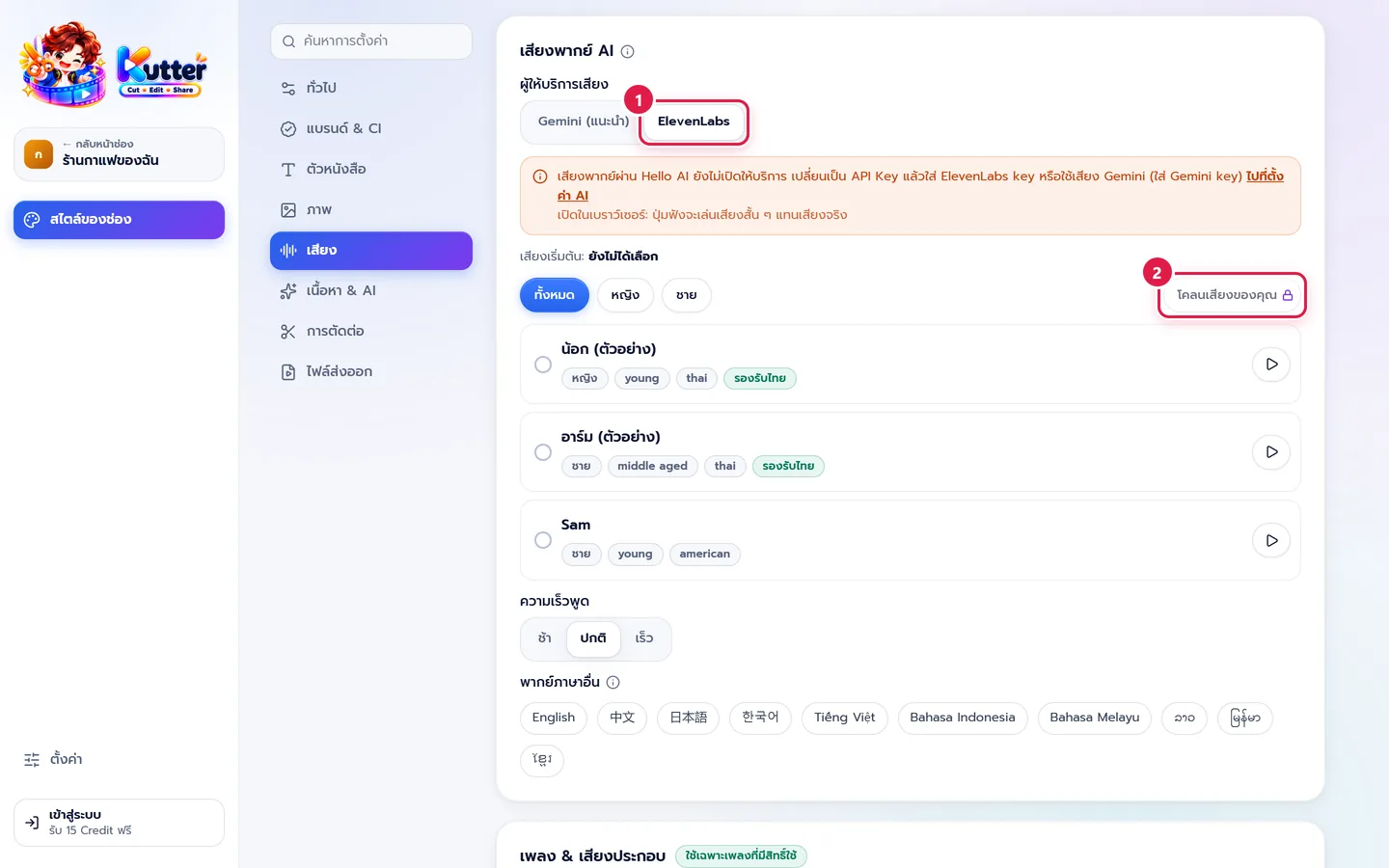
In สไตล์ของช่อง (Channel Style) › เสียง (Sound), choose ElevenLabs (marker 1), then press โคลนเสียงของคุณ (Clone Your Voice) (marker 2). The button shows a lock if your plan is below Creator.
- Read the on-screen tips, then choose a ไมโครโฟน (Microphone)
- Say a few words and watch the mic level bar. It should reach about the middle when you talk normally and not hit the top when you're loud.
- Press เริ่มอัด (Start Recording) and read the on-screen text in the same tone you use in your clips
- When you finish reading, press หยุดอัด (Stop Recording), then press อัดเทคต่อไป (Record Next Take) until you have 1–3 minutes in total
- Listen to every take in เทคที่อัดไว้ (Recorded Takes). Delete any take with noise or an app notification and record it again.
- Set the ชื่อเสียง (Voice Name), tick the confirmation, press สร้างเสียง (Create Voice), then press ใช้เป็นเสียงของช่อง (Use as Channel Voice)
Result: every clip in this channel is voiced in your voice. You can switch back to another AI voice at any time.
Common problems
- If the cloned voice echoes or hisses, delete that voice, move to a room with less echo, and clone again.
- If the mic level bar doesn't move, choose a different ไมโครโฟน (Microphone) and allow the app to use the microphone in your computer's settings.
- If the cloned voice sounds flat, with no emotion, record again in a livelier tone. The clone copies the way you read.
- If pressing the button takes you to Settings, you haven't added an ElevenLabs key yet. See App settings.
Still stuck? Chat with us (bottom right) or email support@helloworld-solution.com