 Kutter
Help › Settings, plans and handoff
Plans and Credits
You only use Credits when you get a real clip, so you can test and edit as much as you like.
Kutter is free to start, and there is no watermark on any plan.
A Credit is the unit you use only when you export a clip to a file. None of the earlier steps cost Credits, such as transcribing, letting AI plan the story, the Storyboard, previews, making a cover, and animation.
Example: you make a 60-second review clip for "ร้านกาแฟของฉัน" (My Café). You can fix the subtitles, change the cover, and preview as many times as you like. It costs 3 Credits, once, when you export.
Available plans
- Free ฿0 forever · 15 Credits when you first sign in, plus free Credits you can claim every day · Export 720p / 30fps · 1 channel, 1 device
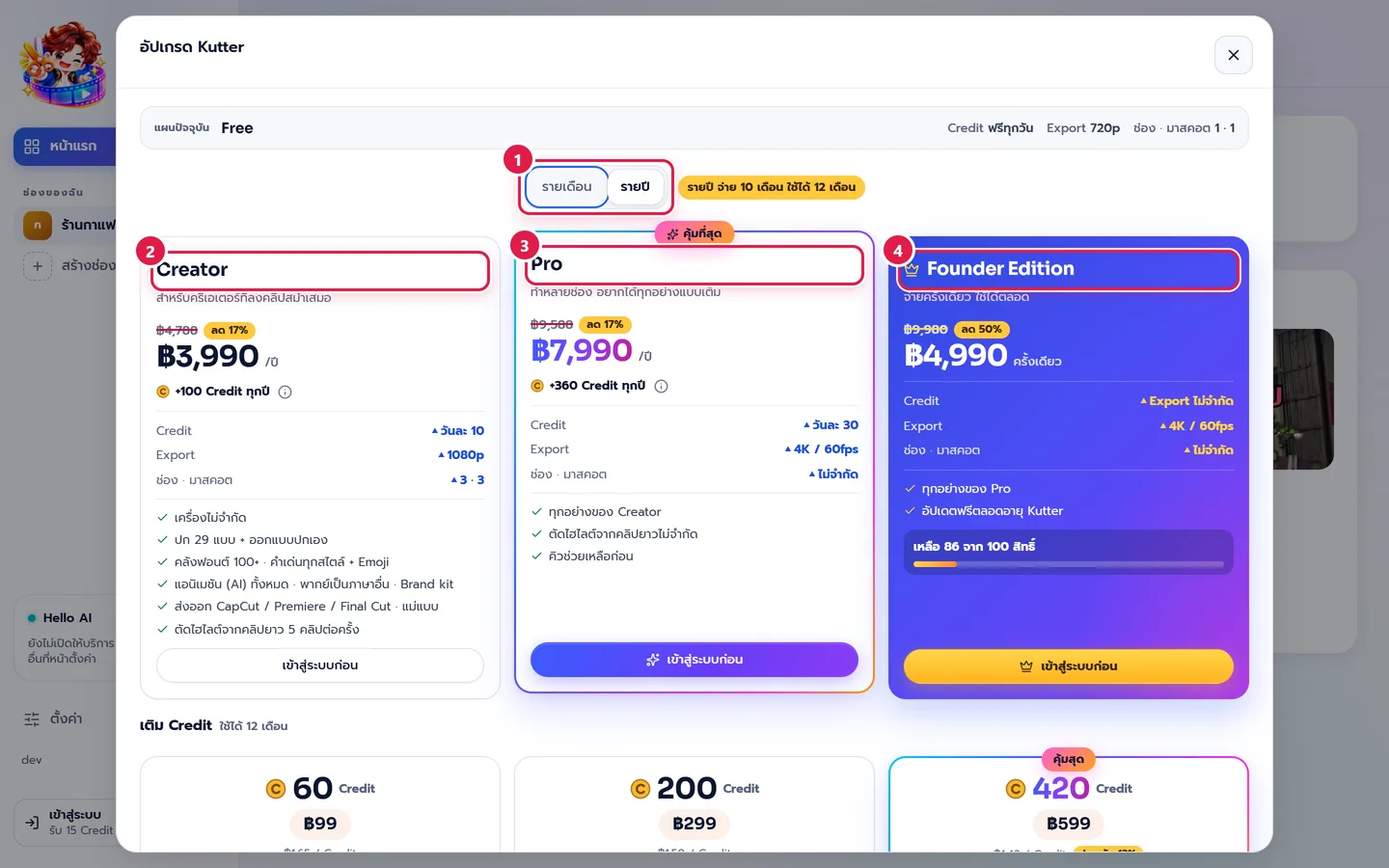
- Creator ฿399 per month or ฿3,990 per year · 10 Credits a day and +100 Credits every time you pay · Export 1080p up to 60fps · 3 channels · 3 devices at the same time · Send to CapCut / Premiere / Final Cut · Voice-over in other languages, clone your own voice, Brand kit
- Pro ฿799 per month or ฿7,990 per year · Everything in Creator · 30 Credits a day and +360 Credits every time you pay · Export 4K / 60fps and H.265 · Unlimited channels · Pro mode and Connect Claude (MCP)
- Founder Edition ฿4,990 one-time payment, yours forever · Everything in Pro · Unlimited exports (no Credits needed) · Free updates for the lifetime of Kutter · First 100 spots only
Monthly plans get the plan's Credits (+100 or +360) every month; yearly plans get them once a year. With yearly, you pay for 10 months and use it for 12. See the full details on the pricing page.
Credits per clip
- Clips up to 90 seconds use 3 Credits
- Up to 3 minutes use 5 Credits
- Up to 10 minutes use 10 Credits
- Over 10 minutes: 10 Credits for every 30 minutes
- If a render fails, the app refunds the Credits automatically (your history shows "คืน Credit" (Credit refund))
- Exporting the same clip again within 7 days costs no extra Credits
Before you start a render, the app shows next to the button "ใช้ … Credit · มี …" (uses … Credits · you have …). If you don't have enough, you'll see "Credit ไม่พอ" (not enough Credits).
Features that need a higher plan
- Frame rates above 30 fps (such as 60fps) need Creator or higher. The "ตามฟุตเทจ" (match footage) option works on every plan.
- H.265 (HEVC) codec needs Pro or Founder Edition.
- Resolution Free 720p · Creator 1080p · Pro 4K
- Number of devices Free 1 device · Creator, Pro, and Founder Edition can be signed in on 3 devices at the same time. See and remove devices in เครื่องของฉัน (My Devices) (Sign in).
- Pro mode and เชื่อมต่อ Claude (Connect Claude) (MCP) need Pro or Founder Edition.
Click a locked option and the app opens the upgrade page so you can pick a plan that unlocks it.
Check your Credits
- Sign in first.
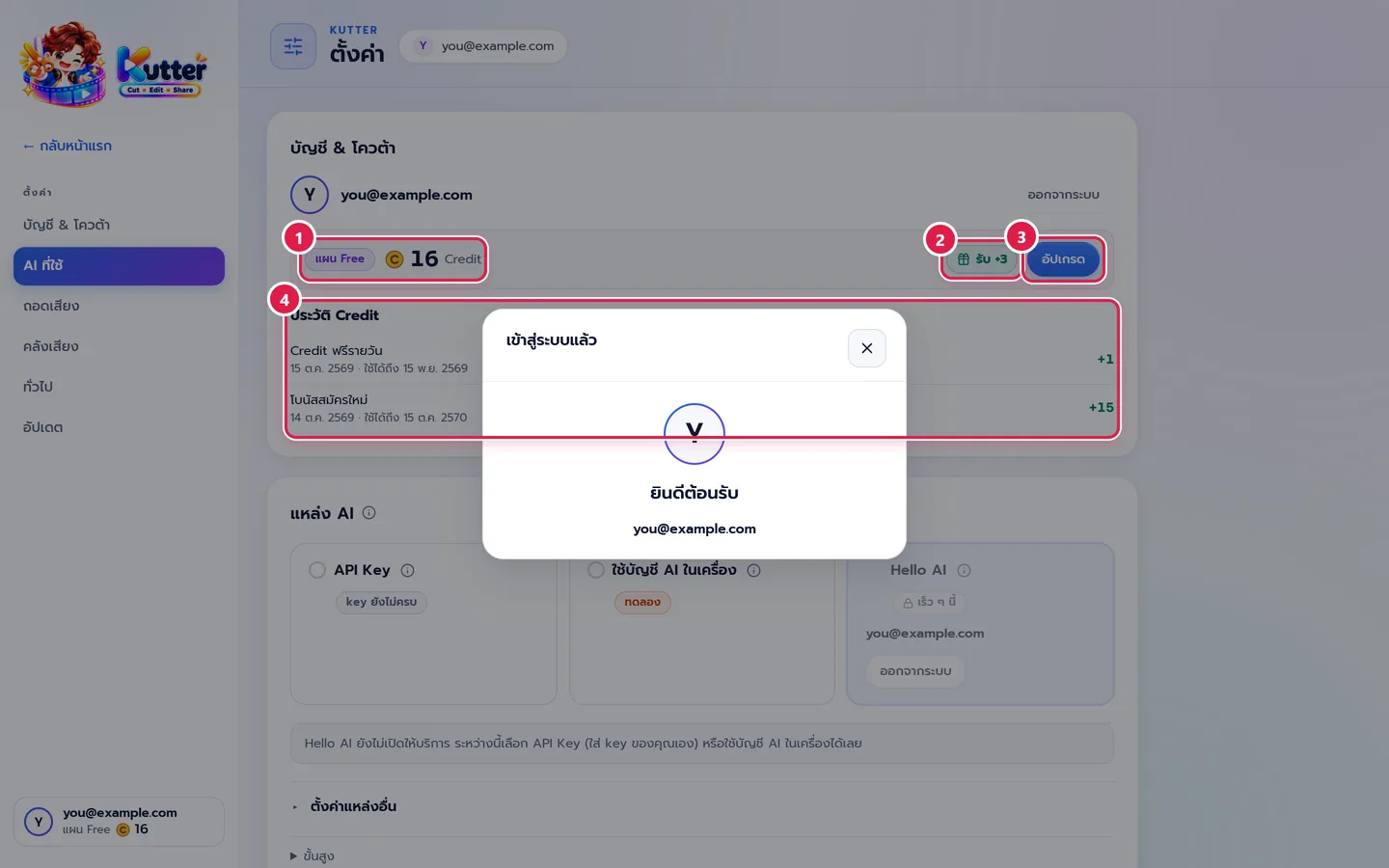
- Open ตั้งค่า (Settings) › บัญชี & โควต้า (Account & Quota).
- See your plan and how many Credits you have left.
- Click "รับ" (Claim) to claim your daily Credits.
- The อัปเกรด (Upgrade) button (or จัดการสมาชิก (Manage Membership) if you're already a member) opens the plans page.
-
Credit history shows when you got or used Credits, and when they expire.
The bottom of the left sidebar also shows your plan and remaining Credits.
Claim free daily Credits
The Free, Creator, and Pro plans have daily Credits (Founder Edition has unlimited exports, so there is nothing to claim). You can claim once a day based on your plan (Free 1 a day · Creator 10 a day · Pro 30 Credits a day). Days you don't claim are lost; they don't add up.
Upgrade or top up Credits
- Click อัปเกรด (Upgrade) in บัญชี & โควต้า (Account & Quota).
- Choose รายเดือน (Monthly) or รายปี (Yearly).
- Pick the Creator, Pro, or Founder Edition plan.
- Or scroll down and pick a Credit top-up pack.
-
Pay by card or PromptPay in your browser. Once you've paid, your plan updates in the app automatically.
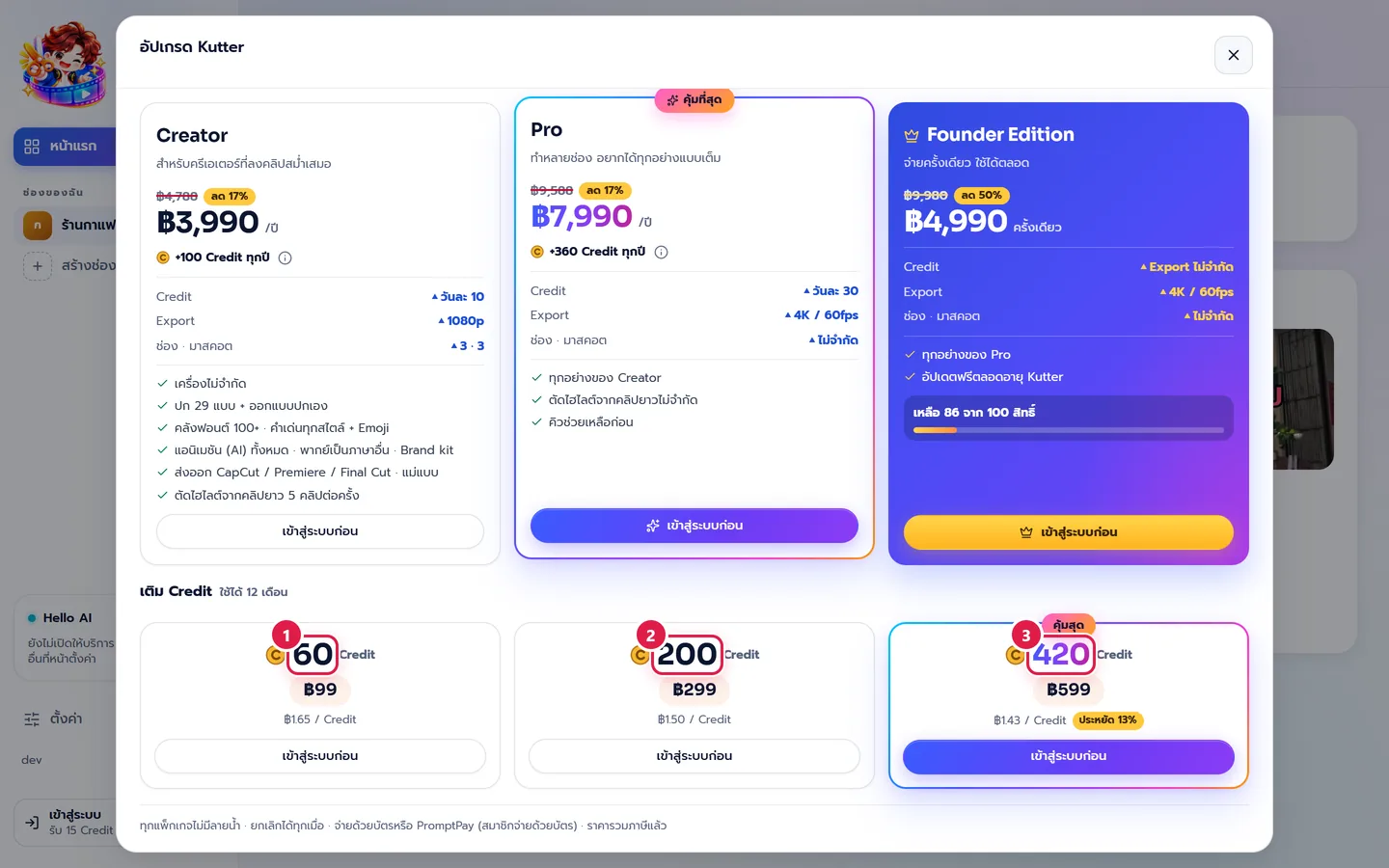
Credit top-up packs (valid for 12 months, available on every plan): XS 20 Credits ฿39 · S 60 Credits ฿99 · M 200 Credits ฿299 · L 420 Credits ฿599 · XL 1,000 Credits ฿1,290
Cancel or change your plan at any time in จัดการสมาชิก (Manage Membership). You keep your benefits until the end of the period you paid for. Your project files stay on your computer as before.
If something goes wrong
- If you see "Credit ไม่พอ" (not enough Credits), claim your daily Credits, top up, or make the clip shorter.
- If you see "เข้าสู่ระบบก่อน" (sign in first) on the buy button, sign in and open the upgrade page again.
- If you paid but your plan hasn't changed, wait a moment and open บัญชี & โควต้า (Account & Quota) again. If it still doesn't show, email support@helloworld-solution.com.
- If the 60fps or H.265 option is locked, check which plan it needs in "Features that need a higher plan" above.
Still stuck? Chat with us (bottom right) or email support@helloworld-solution.com